

There’s no denying that the STEM lab is fun! Most students are thrilled to head your way and get to work. While all that hands-on learning brings excitement, it also brings the need for strong classroom management. That’s why today, I’m sharing some of my favorite classroom management hacks specifically for the STEM Lab. Whether you’re rotating through multiple grade levels, teaching 300+ students a week, or simply trying to keep things running smoothly, you’ll find tips you can start using right away.

My Biggest Challenge in the STEM Lab: Rotating Schedule
Before we dive into my favorite classroom management hacks, let’s talk about how these tips came to be. . . .
One of the trickiest parts of classroom management in the STEM Lab for me was the rotating schedule. If you teach in the same format, you likely know what I’m talking about! You’re not seeing the same group of students all day long. Some days it feels like you’ve taught half the school by lunch! With multiple classes across different grade levels, it’s easy to feel like you’re constantly starting over.
The solution? A simplified and consistent system that you can use for all classes and grade levels! This leads me to my first tip. . . simplicity!
Classroom Management Hack #1 – Keep it Simple!
As I mentioned above, one of the easiest ways to make classroom management feel less overwhelming in the STEM Lab is to lean into a simple system that works. That’s where my Technology-Themed Behavior Management resource comes in. This isn’t just a set of pretty posters. It’s a full system designed to help you manage multiple classes, reinforce behavior expectations, and celebrate student success.
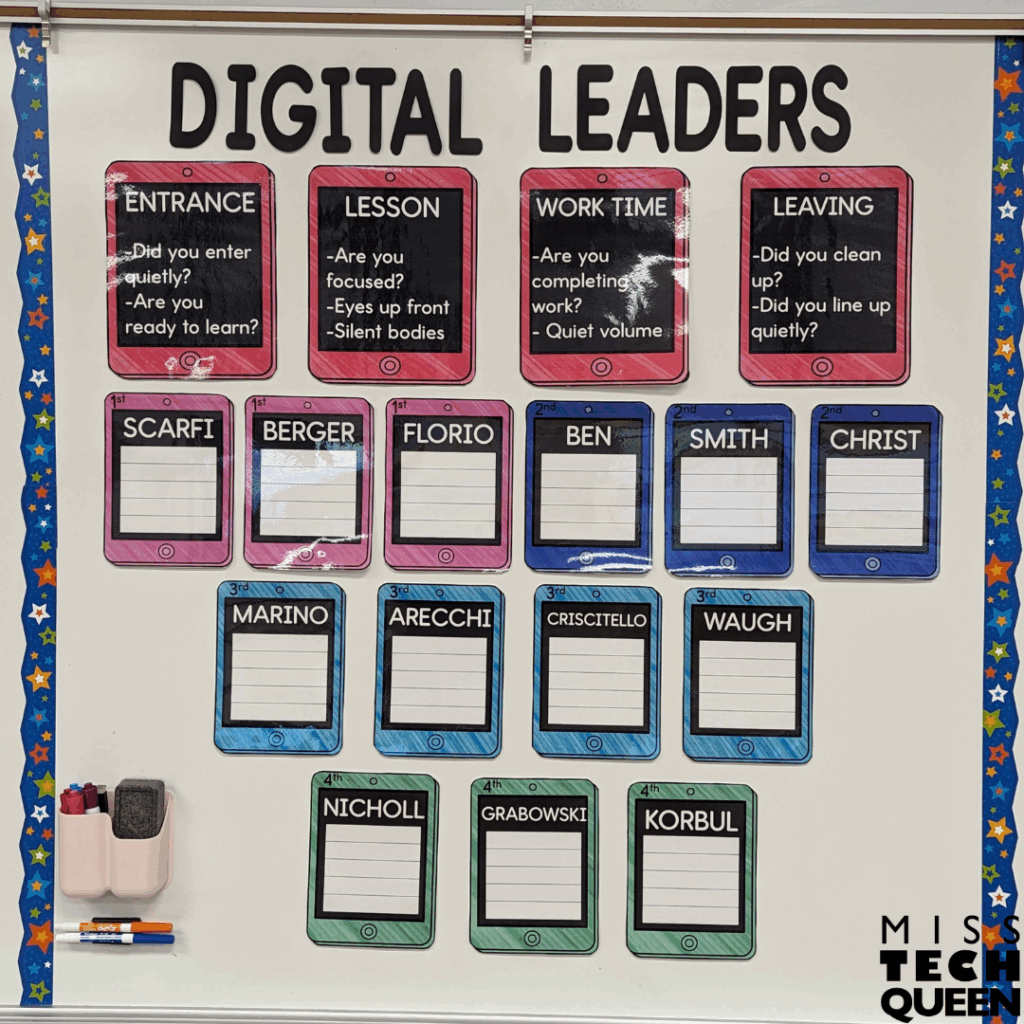
Oh, and remember how I said the trickiest thing for me was the rotating schedule? This simple classroom management system solved that problem for me! I found that keeping behavior expectations the same for every class helped me stay grounded and gave my students structure they could count on. Whether I was teaching first grade or fourth, I used the same system and expectations for each homeroom.
Plus, this resource is editable, which means I can easily add the name for each class to create a custom display and keep track of all my classes! This helped make transitions smooth and eliminated the need to explain the rules over and over again. It’s customizable, flexible, and solves all of my STEM-specific classroom management woes. I mean, really, what more could you ask for?!
How to Set Up & Use This Classroom Management System
Alright, ready to see how this works? Here we go! Each homeroom class gets their own laminated “iPad” chart. These charts are editable in Google Slides, come in a variety of colors, and are super easy to customize!
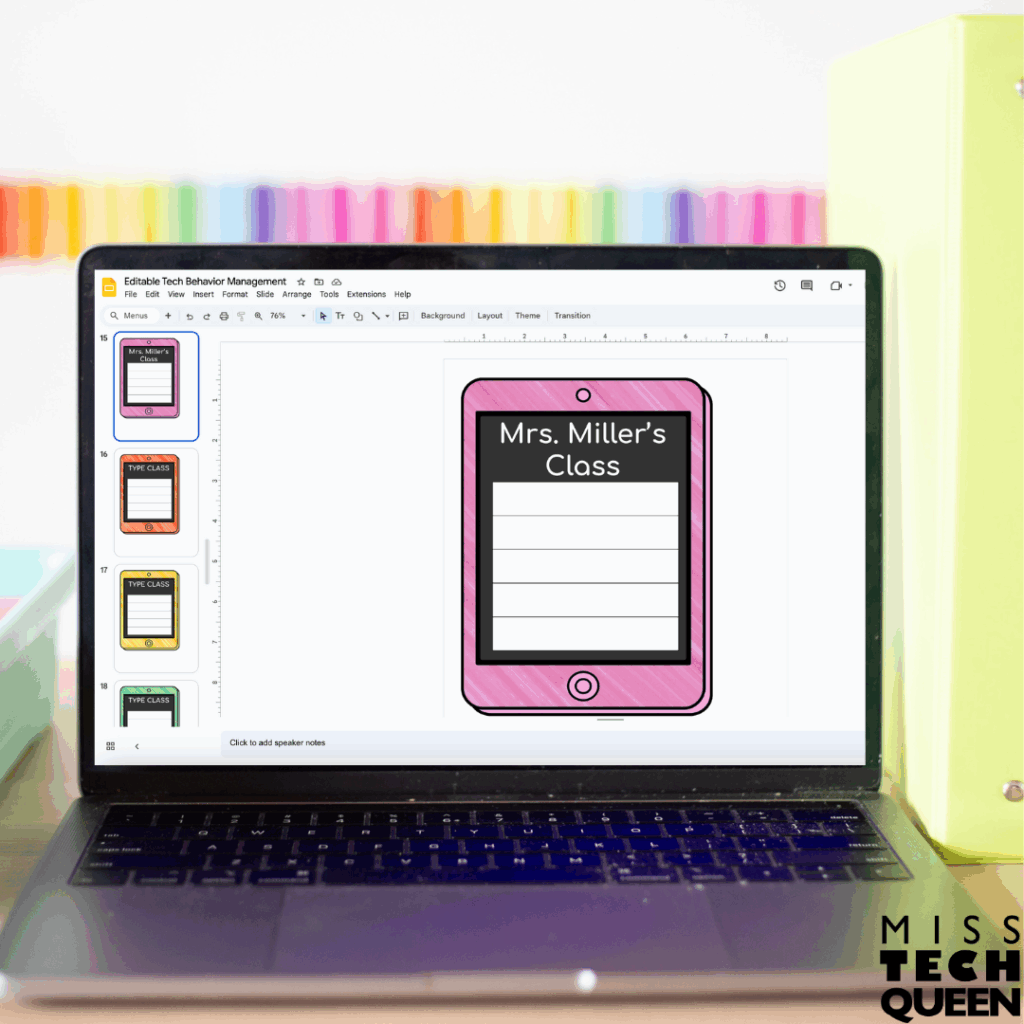
To prepare, you will type the teacher’s name for each class and print them off. Next, laminate them and display these posters with the included expectations posters for each part of your class period.
At the end of each class period, you evaluate behavior across the four simple behavior expectation categories: entrance, lesson time, work time, and dismissal. If the class followed expectations, they earn a star. I like to use a dry-erase marker to draw stars on the laminated iPads at the end of the class period. After five stars, they get a reward! What that reward looks like is totally up to you. Think stickers, a prize bin, or even a popcorn party. You can even make it extra fun by spinning a reward wheel!
What I love most is how this system keeps things visual. I can quickly point to the class’s iPad chart during lessons to refocus the room or encourage better transitions. It’s such a simple shift, but it made a big impact on classroom management across all my STEM rotations.
Classroom Management Hack #2 – Boost Motivation

Celebrating positive behavior is a big deal in the STEM Lab, especially since things can get chaotic fast. That’s another reason I love this system so much!
When I hang up the iPads, I create a wall display that reads, “We Have Tech-rific Behavior” and/or “We Are Digital Leaders.” These colorful cut-outs act like a giant team scoreboard. Each time a class earns a star, I update their iPad chart underneath the phrase.
Since students are able to see other class charts, I can count on a little friendly competition between groups. Just watch how quickly your students will encourage each other to earn that next star!
This isn’t just about rewards. These displays reinforce the culture and values of your STEM Lab. When your students see “Digital Leaders” associated with quiet entrance routines and respectful work time, they start to connect their behavior to their identity as responsible tech users and makers. This is such a great way to motivate and encourage your students day in and day out!
Classroom Management Hack #3 – Reinforce Behavior With STEM Lab Behavior Reports
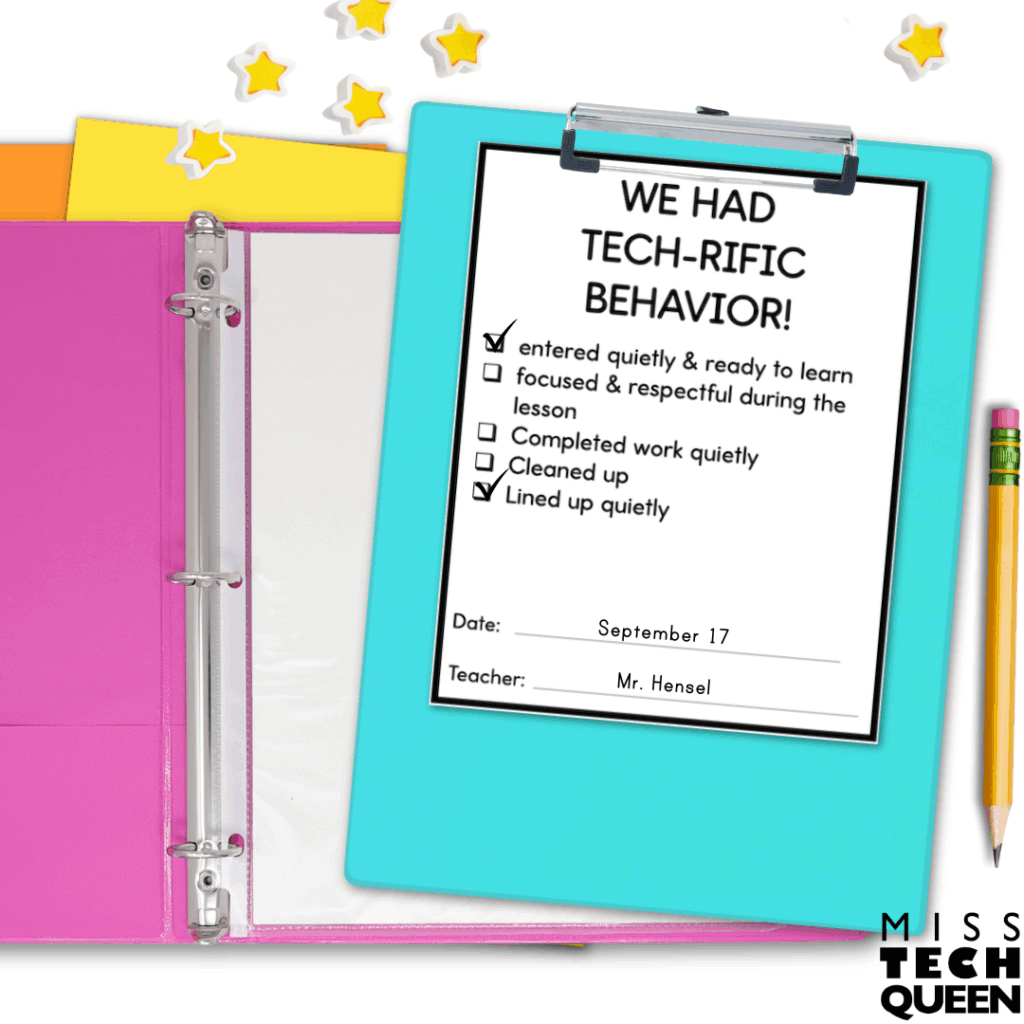
Another part of this classroom management system that saved me time and sanity was the printable “Specials Behavior Report”. These quick checklists help document how each class performed during your STEM lesson. They’re perfect for communicating with homeroom teachers, especially if you’re trying to build consistency across the school day.
Each form gives you space to mark whether the class entered quietly, stayed on task, cleaned up properly, and lined up respectfully. If behavior slips, you can note it, but the real magic is in the positive reinforcement. I loved being able to hand a report to a teacher that said, “We had TECH-RIFIC behavior today!” It gave my students the incentive to keep it up, especially when they knew their homeroom teacher would also see it.
These reports also helped me spot trends over time. If one class consistently struggles with cleanup or talking during work time, I am able to tailor my expectations and conversations for that group. It’s all about using data in a teacher-friendly way to make classroom management decisions that really stick!
Bonus Classroom Management Hacks Just for the STEM Lab
Now, let’s talk about a few bonus hacks that aren’t part of the resource but make a huge difference in your STEM classroom management game.
Use Stations & Visuals
First up, stations and visuals. I always have a clear visual guide posted at each table or station. These signs remind my students of the materials they can use, the task at hand, and how to clean up. STEM activities can get messy quickly. Your students need reminders at eye level, not just verbal directions. These signs definitely cut down on the “What do we do again?” questions!

Establish Clean-Up Jobs
Next, make sure to establish cleanup jobs. I assign each table a “tech crew” role. One person handles materials, one organizes tools, one cleans surfaces, and one checks supplies. Rotating those roles on a weekly basis gives every student ownership. It also makes cleanup at the end of class smooth and fast.
Keep a Log
To make classroom management even easier with a rotating schedule, I also recommend keeping a clipboard with class notes and a behavior log by the door. At the end of each class, you’ll be able to jot down a quick note if there was something important, like a learning win, a behavior struggle, or a reminder for next time. This helps me pick up right where I left off, even if I haven’t seen that group in a few days. When you’re teaching 300+ kids a week, those little systems go a long way toward making your classroom management feel sustainable and effective.
Build in Reflection Time
Make sure to build in reflection time. Just a few minutes at the end of class for your students to rate themselves or talk about how well they worked as a team goes a long way. It reinforces expectations and gives your students the space to self-monitor their behavior. It’s a simple classroom management strategy, but one that boosts student accountability!
Make Classroom Management in the STEM Lab Work for You
You don’t need to overhaul your whole teaching style to make classroom management work in the STEM Lab. You just need systems that match the energy of your space. The Technology-Themed Behavior Management resource makes it easy to track behavior, reinforce rules, and celebrate progress in a way that’s actually fun and easy!

Mix in a few visual reminders, clear routines, and student-led roles, and you’ve got yourself a classroom where your students are engaged and expectations are crystal clear. Best of all, it frees you up! You can focus on what matters most, which is helping your kiddos explore, problem-solve, and create amazing things. Head on over to grab your copy and get started!
Looking for More Classroom Management Tools?
Looking for more support? Whether you’re brand-new to the STEM Lab or have years of experience under your belt, having the right tools for classroom management can make all the difference. Inside my TPT store, you’ll find a variety of tools that fit different teaching styles and student needs. Take a peek at what’s available and find what fits your classroom best!
Save for Later
Don’t forget to pin this post or bookmark it so you can come back when you’re ready to revamp your classroom management routines. Whether you’re starting the school year or rebooting in the middle, these STEM Lab hacks will help you feel more in control and keep your students thriving.